4.4 KV Cache quantization
Estimate KV Cache quantization gains, understand streaming-write constraints, KIVI's different grouping for Key and Value, and FP8 KV Cache Scale calibration, layer skipping, and validation in vLLM v0.32.0
Weights compressed to INT4 finally fit in GPU memory; stretch the context or raise concurrency and you are out of memory again. Chapter 1’s ledger already explained why: weights are a one-time fixed cost, while the KV Cache grows with every historical token of every request. This section looks at how to make each historical token cheaper.
Think of the KV Cache as meeting minutes taken while the meeting runs. Weight quantization is reprinting the reference materials in small type before the meeting; you can take your time. The minutes can only be taken live, and each new sentence has to be searchable right away. So KV quantization has to be cheap and support streaming appends.
⏰ Freshness note: The KIVI part follows the paper. vLLM parameters, Scale schemes, and calibration paths are based on v0.32.0 (released 2026-10-18). The older
calculate_kv_scalesparameter no longer exists in v0.32.0.
📑 Contents
- 1. First estimate how much cache you can save
- 2. Why you cannot copy weight quantization onto KV
- 3. KIVI: Key by channel, Value by token
- 4. vLLM’s FP8 KV Cache
- 5. How to validate long-context gains
- Summary
- Self-check list
- References
1. First estimate how much cache you can save
For ordinary MHA/GQA, let be layers, requests, cached length per request, KV heads, head dimension, and bytes per element:
The leading 2 is for K and V. Take , one request caching 32768 tokens, at 16-bit:
8-bit is about 2 GiB; 2-bit about 0.5 GiB. The 2-bit figure is only a lower bound on the codes themselves. It does not yet count per-group Scale/zero-point, high-precision residual regions, alignment, or paging overhead. MLA, sliding window, and hybrid architectures have different cache layouts and need their own accounting.
Two things stack: PagedAttention wastes less of the space you already have; quantization makes each element smaller. Weight quantization does not automatically change here. KV precision has to be configured on its own.
2. Why you cannot copy weight quantization onto KV
The time constraints differ. Weights can spend hours offline on GPTQ and then be reused forever. KV is produced while the request runs; every new token writes a new piece. Quantization has to be cheap enough, or the memory you save is paid for in latency.
Error enters in different places. Write :
- Key error first changes , then goes through Softmax, and can make the model attend to the wrong positions.
- Value error enters and affects the output after being weighted by the attention scores.
So KV quantization effects have to be checked back on long-context tasks. A few short chats looking fine does not prove long-document retrieval, cross-segment reasoning, or long outputs are fine too.
3. KIVI: Key by channel, Value by token
3.1 Two tensors, two groupings
KIVI is a tuning-free 2-bit KV Cache quantization algorithm. It starts from an observation: in the models it studied, Key has clear channel outliers and Value does not. So the paper argues for quantizing Key per channel and Value per token.
Fix one layer, one request, and one KV head, treat both K and V as matrices, and keep the section 4.1 convention that “row = token, column = channel”:
- Key Per-channel: fix a channel and group consecutive tokens for quantization parameters (cut vertically).
- Value Per-token: fix a token and group along channels for quantization parameters (cut horizontally).
The figure below uses group size G = 4 and residual length R = 4 to show the two groupings. Blue is already-quantized 2-bit data; red columns are Key outlier channels; yellow is the full-precision residual region inside the dashed box; each black frame shares one set of quantization parameters:
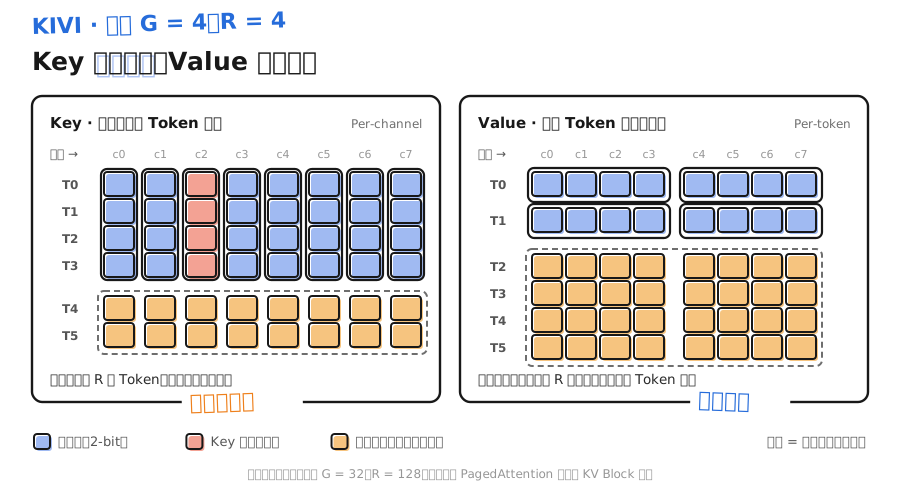
Cutting Key vertically isolates large-magnitude channels so they no longer drag the others down. Cutting Value horizontally gives each token its own range. The black frames are groups that share quantization parameters; they are not the same thing as PagedAttention’s physical KV blocks.
That matters especially at 2-bit: each group has only 4 codes. Pack numbers of very different sizes into one group and the small values almost all collapse onto the same code (section 4.1).
Asymmetric in the paper title means K and V use different strategies. Inside a group the mapping is still min/max asymmetric. “How you group” and “how you encode inside a group” are two separate questions.
3.2 What if new tokens do not fill a group
Key groups span multiple tokens, so the newest few tokens may not fill a group yet. KIVI keeps a high-precision Residual Cache for that. It takes part in Attention together with the already-quantized history; once enough new tokens accumulate, they are quantized in a batch and moved into the history region. Value is quantized per token and does not need to fill a group. Its residual region only keeps the most recent tokens: each new token in pushes the oldest one out after quantization, like a sliding window.
The residual region makes streaming writes feasible and keeps recent tokens at high precision, but it also costs extra space. The shorter the context, the larger the share taken by residual region and metadata, and the farther the real compression ratio sits from the “16-bit to 2-bit is 8×” headline.
The paper tests on Llama, Falcon, and Mistral, reports peak memory (including model weights) down 2.6×, batch size up to 4×, and throughput under real inference load up 2.35–3.47×.
📌 Key point: KIVI is a paper method with its own implementation. It is not vLLM’s default KV path. 2-bit is the configuration the paper validated on its models and tasks; change the model and you need to re-evaluate.
4. vLLM’s FP8 KV Cache
The more common engineering path is to store KV as FP8: half the data, far less precision pressure than 2-bit, and no special cache structure like KIVI. FP8 numeric formats are covered in section 4.5; here we only look at usage.
4.1 Pick a format
Common kv_cache_dtype values:
| 📊 Value | Meaning | Support notes (v0.32.0 docs) |
|---|---|---|
auto | Match the model data type | Default |
fp8 / fp8_e4m3 | E4M3, higher precision | CUDA 11.8+ and ROCm |
fp8_e5m2 | E5M2, larger range, lower precision | CUDA 11.8+ |
CacheDType in the source also lists more options like int8_per_token_head, fp8_per_token_head, and nvfp4. Those depend on specific Attention backends; check that backend’s support before using them. A few models such as DeepSeek-V3.2 also default to FP8 KV.
4.2 FP8 still needs Scale
FP8’s exponent range is limited, so real values still need a Scale to land in a usable interval. v0.32.0 supports two Scale granularities:
- Per-tensor: one Scale each for Q, K, and V.
- Per-attention-head: one Scale per head.
q_scalehasnum_headsentries;k/v_scalehavenum_kv_heads. Currently only the Flash Attention backend supports this, and you must calibrate with LLM Compressor.
Scale comes from two paths:
- No calibration: set only
kv_cache_dtype="fp8", and every Scale is 1.0. If the checkpoint has no Scale, the startup log warns “Using KV cache scaling factor 1.0 for fp8_e4m3”. - Calibrate on a dataset (recommended in the docs): use LLM Compressor’s
QuantizationModifierwithkv_cache_scheme, run oneoneshoton the calibration set, and write Scales into the checkpoint. The docs’ example uses 512 samples, max length 2048, andstrategyof"tensor"or"attn_head".
⚠️ Caution: The older calculate_kv_scales parameter that estimated Scale from random tokens is gone in v0.32.0. You are left with “Scale = 1.0” and “read calibrated Scales from the checkpoint”. Running successfully is not the same as having calibrated.
4.3 Get it running first, then calibrate
The offline snippet below only checks that the FP8 KV path can load and generate:
from vllm import LLM, SamplingParams

llm = LLM(
    model="Qwen/Qwen2.5-7B-Instruct",
    dtype="bfloat16",  # published precision of the checkpoint
    max_model_len=4096,
    kv_cache_dtype="fp8",  # uncalibrated: every Scale is 1.0
)
outputs = llm.chat(
    [[{"role": "user", "content": "In two sentences, say what KV Cache quantization saves."}]],
    SamplingParams(temperature=0, max_tokens=128),
)
print(outputs[0].outputs[0].text)
A real comparison should use a checkpoint with calibrated Scales, and confirm in the log that the Scale-is-1.0 warning does not appear.
4.4 Skip sensitive layers
Some layers are more sensitive to KV quantization, for example sliding-window Attention layers. --kv-cache-dtype-skip-layers keeps the named layers at original precision and quantizes the rest as usual:
vllm serve <model> \
  --kv-cache-dtype fp8 \
  --kv-cache-dtype-skip-layers sliding_window  # or layer indices, e.g. 0 1 23
The matching Python argument is kv_cache_dtype_skip_layers=["sliding_window"].
4.5 Storage precision is not compute precision
FP8 KV first cuts storage. After a read, the backend may convert back to high precision before computing, or run Attention directly in the FP8 domain. The vLLM docs note that with the Flash Attention 3 backend and FP8 KV, Attention runs in the FP8 domain and Query is quantized to FP8 as well. So kv_cache_dtype alone does not tell you the precision of the whole Attention path. Combine GPU, backend, and startup logs (Chapter 2 covered backend selection).
5. How to validate long-context gains
Fix the weight format and change only the KV config, or you will not know where the change came from:
| 📊 Gain to validate | Comparison condition | What to watch |
|---|---|---|
| Cache capacity | Same KV memory budget | Tokens that fit; context and concurrency you can carry |
| Per-request latency | Same input/output length and concurrency | TTFT, TPOT; whether quantization and conversion add overhead |
| Serving throughput | Same quality bar and latency target | Whether the extra capacity turns into more useful concurrency |
| Long-context quality | Independent long-text task set | Retrieval accuracy, citation positions, cross-segment reasoning, long outputs |
vLLM hands remaining GPU memory to the KV pool, so two runs can look similar in nvidia-smi. What actually changes is how many KV tokens the same budget holds. That number is in the startup log, and it says more than a screenshot of total memory.
When combining weight quantization with KV quantization, validate each alone first, then the pair. The two error sources stack in the same network; each passing alone does not mean the combination is fine.
📝 Summary
- KV quantization shrinks storage per historical token. Gains grow with context length and concurrency.
- KV is produced online, so the method must be cheap and support streaming appends. K error affects the attention distribution; V error affects the weighted output.
- KIVI groups Key by channel and Value by token, and uses a high-precision residual cache for new tokens that do not yet fill a group.
- FP8 KV in vLLM v0.32.0 supports Per-tensor and Per-attention-head Scales. Scale is either 1.0 or comes from an LLM Compressor-calibrated checkpoint.
- Sensitive layers can keep original precision with
--kv-cache-dtype-skip-layers. Under the FA3 backend, Attention itself also runs in the FP8 domain. - Judge gains from KV token capacity in the logs, and run a separate long-context quality eval.
🎯 Self-check list
- Can estimate a model’s KV footprint at a given context with
- Can state how KV quantization differs from weight quantization in time constraints and error propagation
- Can draw KIVI’s Key and Value grouping directions and explain why
- Can explain why the Residual Cache pulls down the real compression ratio
- Can name the two FP8 KV Scale granularities and two sources in vLLM v0.32.0
- Can tell from the startup log whether FP8 KV really used calibrated Scales
- Can explain how to tell whether KV quantization added capacity when total memory use looks the same