4.2 W8A8 quantization
Start from channel outliers in activations, derive SmoothQuant's equivalent scaling and migration strength α, and understand smoothing coefficients, INT8 GEMM, and the offline quantization flow
In the last section’s experiment, a single 20 made small values like 0.2 and 0.5 almost unreadable. LLM activations have the same headache: a few channels are dozens of times larger than the rest, and INT8’s 255 bins are not enough to go around. SmoothQuant’s fix is like balancing a carrying pole: the activation side is too heavy, so you shift some of the weight onto the weight side until neither side is crushing, then quantize each separately. The shift is a mathematically exact equivalent scaling, so the linear layer’s output does not change.
⏰ Freshness note: The algorithm part follows the SmoothQuant paper. vLLM and LLM Compressor support status is based on the vLLM v0.32.0 docs (released 2026-10-18).
📑 Contents
- 1. Where W8A8 gets hard
- 2. Equivalent scaling: divide one side, multiply the other
- 3. How to pick the migration strength α
- 4. From the transform to INT8 GEMM
- 5. Hands-on: verifying one dot product
- Summary
- Self-check list
- References
1. Where W8A8 gets hard
W8A8 here specifically means INT8 weights × INT8 activations, so linear layers can run INT8 matrix multiplies directly. Weight-only schemes (section 4.3) leave activations alone; W8A8 has to handle a different input every time, online.
Suppose most elements of a token’s hidden vector sit in , but one channel hits 80. Taking Scale from the row’s max absolute value gives , so numbers in only land on codes from to . Per-token quantization separates differences across tokens, but it cannot fix channel differences inside the same token.
The SmoothQuant paper observed that these large values concentrate on a few fixed channels and keep showing up across tokens, while weight distributions are much flatter and relatively easy to quantize. So you can hand part of the activation quantization difficulty over to the weights.
2. Equivalent scaling: divide one side, multiply the other
2.1 The formula
Keep the matrix orientation from section 4.1:
Take a diagonal matrix with every :
For the -th input channel, divide column of by and multiply row of by . In exact arithmetic the divide and multiply cancel, so the output is unchanged.
The scaling hits every token of the same channel, so has only coefficients, independent of token count, and can be computed offline. Under PyTorch’s transposed weight layout, you multiply the weight columns instead.
2.2 See it in one dot product
The figure below expands just one token and one output channel. Blue cells are activations, yellow cells the matching weights, and the red dashed box marks the scaled third channel:
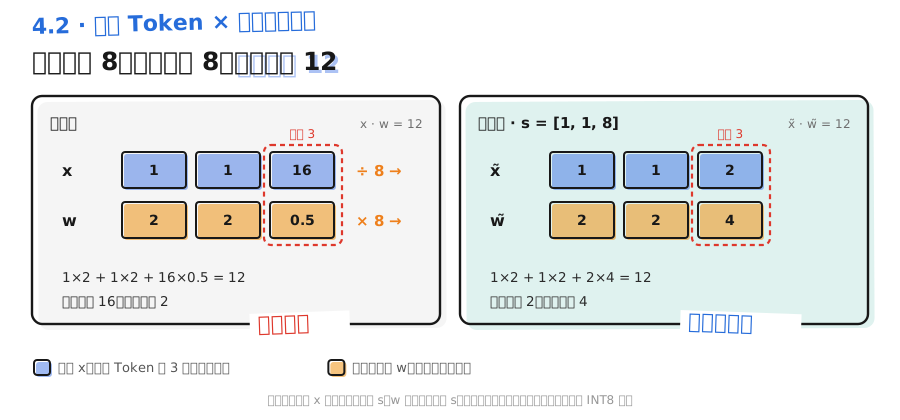
Before smoothing, the inner product of and is 12. Divide the third activation by 8 and multiply the matching weight by 8, and you get and , still with inner product 12. The activation max falls from 16 to 2; the weight max rises from 2 to 4. Both inputs now have milder ranges.
📌 Key point: After smoothing, and are still floating-point numbers. There is no INT8 encoding yet. Smoothing itself introduces no error; its job is to make the next quantization step less lossy. SmoothQuant W8A8 = smoothing + quantization. Do not conflate the two steps.
3. How to pick the migration strength α
Shift too little and the activation spikes remain; shift too much and the weights grow new spikes. SmoothQuant uses a migration strength to control how much you move:
Activation maxima come from calibration samples; weight maxima come straight from the parameters. Implementations also need to guard against a near-zero denominator.
- Larger flattens activations more and hands more difficulty to the weights; smaller does the opposite.
- The paper calls a general “sweet spot” for OPT and BLOOM families; GLM-130B, whose activations are harder to quantize, used 0.75.
- The paper’s ablations show that below about 0.4 activations are hard to quantize, and above about 0.6 weights are hard (for their experiment models). Later versions push LLaMA-family models to 0.8 or even higher.
- A good value has to be searched on a small calibration batch for each model. The paper does a grid search on a Pile subset.
The LLM Compressor INT8 W8A8 example in the vLLM docs uses SmoothQuantModifier(smoothing_strength=0.8). That smoothing_strength is .
⚠️ Caution: There are two kinds of “Scale” here. is a smoothing coefficient used only for the equivalent transform. The INT8 quantization Scale is computed after smoothing from the new range, and it maps values onto integers.
4. From the transform to INT8 GEMM
4.1 Offline flow
The upper half of the figure below is the one-time offline four-step path; the lower half is the runtime path on every forward. The orange polyline hands the exported INT8 weights and weight Scales to the runtime GEMM:
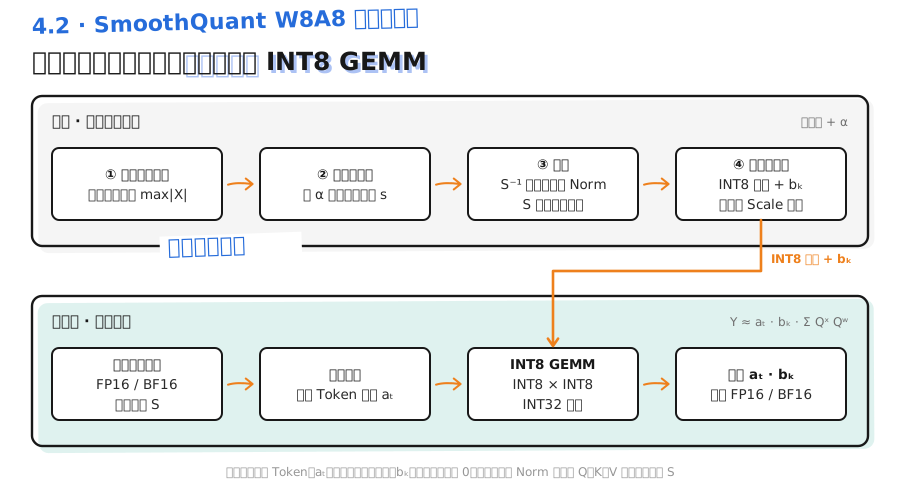
- Collect activation ranges: run a forward on representative calibration text and record per-input-channel maxima for each linear layer you plan to quantize.
- Compute and fold smoothing coefficients: does not have to be its own operator. You can fold it into the preceding LayerNorm/RMSNorm scale parameters, and multiply straight into the weights.
- Quantize: pick weight and activation granularities, decide whether activations use static calibration or dynamic Scales, then check per-layer error and full-model quality.
- Export: save real INT8 weights and the quantization config for an inference kernel that supports the format.
Folding has conditions. If one Norm’s output feeds Q, K, and V projections at once, all three must share the same , or you cannot share one . You also cannot freely move scaling across residuals or nonlinear ops; stick to the transform sites the tooling supports.
In the LLM Compressor example from the vLLM v0.32.0 docs, the INT8 W8A8 recipe is smooth first, then quantize with GPTQ:
from llmcompressor.modifiers.quantization import GPTQModifier
from llmcompressor.modifiers.smoothquant import SmoothQuantModifier

recipe = [
    SmoothQuantModifier(smoothing_strength=0.8),
    GPTQModifier(targets="Linear", scheme="W8A8", ignore=["lm_head"]),
]
Keeping lm_head at original precision is a common pattern for this kind of recipe. The exported checkpoint loads directly into vLLM; concrete commands are in section 4.6.
4.2 How runtime computes it
To see the data flow, assume smoothed activations are quantized per token, weights per output channel, and both zero-points are 0:
Both Scales factor out of the sum:
The sum is INT8 multiply with INT32 accumulate, then multiply back by into FP16/BF16. So W8A8 only describes the two inputs of the matrix multiply; accumulation and output stay at higher precision. That also explains the conclusion from section 4.1: if the activation Scale were set per channel , it would not factor out of the sum, so you have to erase channel differences with smoothing first.
4.3 Gains and when they apply
The paper reports up to 1.56× speedup and half the memory on the models it tested, with negligible accuracy loss. Whether a full model actually speeds up depends on whether the time INT8 GEMM saves covers the cost of online activation quantization, Scale handling, and type conversion. Small matrices, unfused ops, or workloads dominated by Attention and scheduling see limited gains.
Hardware has boundaries too. The vLLM v0.32.0 docs note that INT8 W8A8 compute is supported on NVIDIA GPUs from Turing through Hopper, and not supported on Blackwell (compute capability 10.0 and above). Those cards should use FP8 instead (section 4.5).
On quality, watch inputs the calibration set did not cover: long text, code, special symbols, and low-resource languages. Keep sensitive layers at high precision when needed.
5. Hands-on: verifying one dot product
Take the section 2.2 example and add symmetric INT8 quantization. qdq means Quantize-Dequantize: compute the integer codes and immediately convert back to float to simulate quantization error. It does not run a real INT8 GEMM.
def qdq(values):
    amax = max(map(abs, values))
    scale = amax / 127 if amax else 1.0
    return [max(-127, min(127, round(v / scale))) * scale for v in values]


def dot(a, b):
    return sum(x * y for x, y in zip(a, b))


x, w = [1.0, 1.0, 16.0], [2.0, 2.0, 0.5]
s = [1.0, 1.0, 8.0]  # hand-picked for clarity; real models get this from calibration stats and α
x_s = [v / k for v, k in zip(x, s)]
w_s = [v * k for v, k in zip(w, s)]

print("original output:", dot(x, w))
print("smoothed output:", dot(x_s, w_s))
print("direct quant:", round(dot(qdq(x), qdq(w)), 6))
print("smooth then quant:", round(dot(qdq(x_s), qdq(w_s)), 6))
The first two lines are both 12.0, so smoothing is an equivalent transform. Direct quantization gives about 12.094488; smooth then quantize about 12.063240. Error drops from 0.094 to 0.063. This is only a mechanism demo on one output channel. Real-model results need full-model evaluation.
📝 Summary
- INT8 W8A8 quantizes weights and activations together. The hard part is activation outliers concentrated on a few channels.
- SmoothQuant uses to move some of the activation quantization difficulty onto the weights, then quantizes each side.
- Migration strength balances the two sides. 0.5 is a common starting point in the paper; different models need a search.
- Smoothing coefficients can be folded offline into the previous operator. Projections that share an input must use the same coefficient set.
- Activation Scale can only be set per token if it is to factor out of the sum. That is the fundamental reason you need to smooth first.
- In vLLM v0.32.0, INT8 W8A8 is not supported on Blackwell; those cards should use FP8.
🎯 Self-check list
- Can explain why Per-token quantization does not stop channel outliers
- Can point out which axis of and of the smoothing transform changes, and how many coefficients has
- Can write the smoothing formula for and say what raising does
- Can tell smoothing coefficients apart from quantization Scale
- Can explain why Q, K, and V that share one Norm output must be handled together
- Can write the W8A8 runtime dequantization formula and say what precision accumulation uses
- Can describe one SmoothQuant + GPTQ W8A8 quantization with an LLM Compressor recipe