4.3 Weight-only INT4
Understand W4A16 storage and compute, GPTQ's second-order error compensation, AWQ's activation-aware scaling, and how Marlin turns INT4 storage into inference gains
Section 4.2’s W8A8 has to deal with weights and activations at once. This section takes another path: keep activations in FP16/BF16 and compress only the weights to 4-bit, i.e. W4A16. In the decode phase every step rereads the full weight set from GPU memory. Shrink the weights to a quarter and the read time shrinks with them. The catch is that 4-bit has only 16 codes, and the tick gap is about 17× that of 8-bit (section 4.1), so you need a way to keep the error from hurting the output too much.
GPTQ and AWQ are the two mainstream fixes: the former is like adjusting the remaining pieces as you place each puzzle piece; the latter finds the most important pieces first and protects them. Marlin then makes the GPU read and compute those 4-bit weights efficiently.
⏰ Freshness note: The algorithm parts follow their respective papers. vLLM kernel selection and toolchain advice are based on vLLM v0.32.0 (released 2026-10-18).
📑 Contents
- 1. W4A16 storage and compute
- 2. GPTQ: quantize and compensate as you go
- 3. AWQ: find channels to protect from activations
- 4. Marlin: keep unpacking from slowing compute
- 5. How to compare GPTQ and AWQ
- Summary
- Self-check list
- References
1. W4A16 storage and compute
INT4 weights sit in GPU memory packed: one 32-bit word holds eight 4-bit codes, plus a Scale per group, and asymmetric schemes also store a zero-point. At inference the kernel reads the codes, dequantizes them on-chip to FP16/BF16, then multiplies with 16-bit activations.
So when you see an “INT4 model”, keep two things apart: the storage type of the weights is INT4; the input type of the multiply instructions is still 16-bit. This path saves weight-read bandwidth, not multiply compute.
The left side of the figure below is one group of weights in memory (blue = INT4 codes, yellow = FP16 Scale, white cells = zero-points only for asymmetric schemes). The right side shows the kernel restoring them on-chip to FP16 weights (green) before multiplying with 16-bit activations (red):
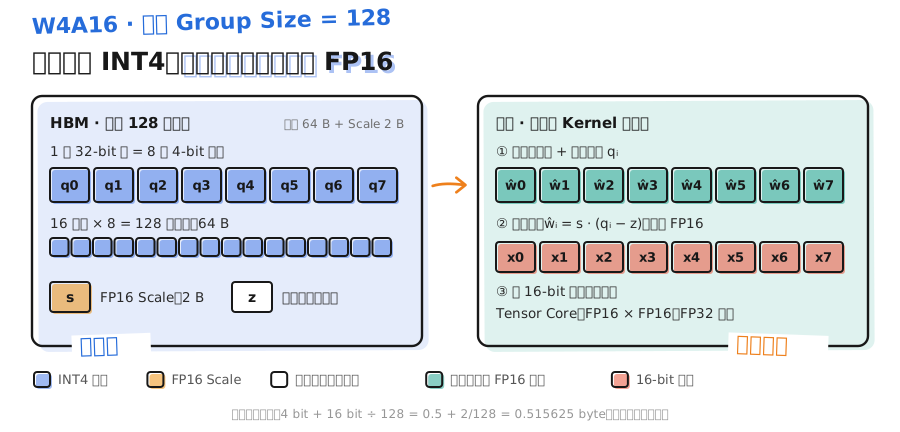
Grouping parameters also take space. When every 128 INT4 weights share one FP16 Scale, the average per weight is:
Add zero-points and alignment and it grows a little more. How much time you save depends on whether unpacking and dequantization fuse with the matrix multiply in one kernel, and how much of the rest of the step is still KV reads, Attention, and so on.
2. GPTQ: quantize and compensate as you go
2.1 The objective has to include the input
If you only minimize , every weight’s error is scored the same. After the linear layer, some errors get amplified by the input and some cancel. GPTQ uses calibration inputs and switches the objective to reconstruction error on the layer output:
Take one output-channel weight column , and write :
describes, under real inputs, how costly error is in each direction and how input channels correlate. It comes only from that single linear layer’s reconstruction objective; you do not need the Hessian of the full language-model loss.
2.2 Compensation intuition
When one puzzle piece sits crooked, you can nudge neighboring pieces that are still free to make up for it. GPTQ works the same way: each time you fix one weight, you spread its error onto the weights that are still unquantized.
Take a 2-D example. If the two columns of the calibration input are nearly identical, the output mostly depends on . Quantizing to 0.30 overshoots by 0.04; while is still free, subtract 0.04 from it and the output barely changes. When the two columns are not fully identical, how much you compensate is decided by , not a simple plus-and-minus.
Let be the index set of weights not yet fixed, and the matching submatrix. After fixing to the quantized value , the optimal compensation is:
The -th entry turns into exactly; the rest give the adjustments for remaining weights. is the dequantized value on the same scale as the original weight, not the integer code. The official implementation also adds damping for numerical stability and uses Cholesky factorization with block updates to cut cost.
Do not mix up the two “128”s: update block size decides how many columns you process at once and how often you batch-propagate error; Group Size decides how many weights share one Scale.
2.3 Cost and effect
The paper reports that GPTQ takes about 4 GPU-hours to quantize a 175B-parameter GPT model, that accuracy loss is negligible when dropping to 3–4 bit, and that it was the first time a 175B model could run on a single GPU. Quantization is a one-time offline cost; inference no longer needs .
3. AWQ: find channels to protect from activations
3.1 Large weight does not mean most important
For , a weight error hits the output as . How much a weight matters depends on how large the activation it multiplies is, not on how large the weight itself is.
The AWQ paper makes two points: protecting just 1% of the salient weights already cuts quantization error a lot; and you should find those salient channels from the activation distribution, not from the weights.
3.2 Use scaling instead of mixed precision
The most direct protection is to keep that 1% in FP16, but mixed-precision storage layouts are hostile to kernels. AWQ uses scaling instead: before quantization, amplify salient-channel weights by and divide the matching inputs by . Reusing the notation from section 4.2:
produces the low-bit codes; dequantizes with Scale and zero-point. After amplification, as long as the group’s quantization tick gap does not grow by the same factor, dividing back by leaves a smaller effective error on that channel. Amplify too much and you widen the whole group’s range, hurting other weights in the group, so AWQ searches scale factors on calibration data and pairs that with clipping to control total error.
What you deploy is still a regular INT4 layout with no separately stored FP16 weights, so efficient kernels support it easily. The paper’s companion TinyChat is more than 3× faster than Hugging Face FP16 on desktop and mobile GPUs.
3.3 Compared with SmoothQuant
Both use paired scaling, but for different goals:
| 📊 Method | What it handles | Scaling direction | Typical config |
|---|---|---|---|
| SmoothQuant | Activation outliers that make INT8 activations hard | Flatten activations; hand difficulty to weights | INT8 W8A8 |
| AWQ | Salient-channel weight error amplified by large activations | Amplify salient weights; cut their relative error | INT4 W4A16 |
AWQ’s scale search alone still leaves you with floating-point weights; you still have to quantize and pack afterward. When comparing methods, keep three intermediate products apart: scaled floating-point weights, Fake-Quant (QDQ) floating-point weights, and the real packed deployment weights.
4. Marlin: keep unpacking from slowing compute
Once the codes are ready, there is still an engineering problem. The naive path expands the whole layer’s INT4 into FP16, writes it back to GPU memory, then calls a normal GEMM. That adds a large read/write round trip and gives back all the bandwidth you just saved.
Marlin puts weight reads, unpacking, dequantization, and the matrix multiply into one kernel pipeline. The left side of the figure is the naive path, where the expanded FP16 weights (green) write back to memory and get read again; the right side is Marlin, where blue data movement and yellow on-chip compute stagger by one tile and run together:
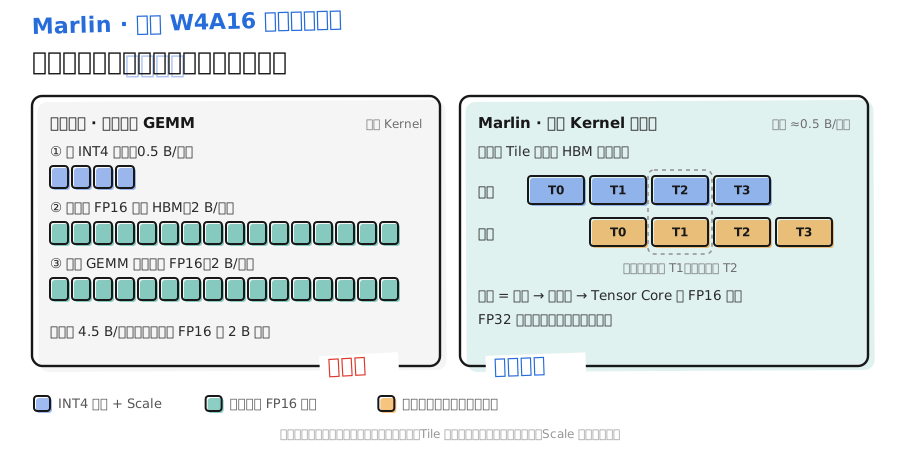
Weights are pre-reordered into a layout that suits runtime reads, then tiling and multi-level buffering from Module 2 overlap data movement with compute. The paper reports near the 4× theoretical speedup ceiling for batches of 16–32, still clear gains at 64–128 as the speedup shrinks, and up to about 2.8× end-to-end once wired into a vLLM backend.
Once the batch gets large, compute becomes the bottleneck again and the advantage of reading less weight is diluted. That matches the Roofline analysis in Chapter 1.
4.1 Kernel selection in vLLM
In vLLM v0.32.0, quantization method names and kernels are already decoupled:
--quantizationset toawq,awq_marlin, orauto_awqall resolve to the sameauto_awqconfig; GPTQ’sgptq,gptq_marlin, andauto_gptqwork the same way. Leave it unset and vLLM auto-detects fromquant_methodin the checkpoint.- Which kernel actually runs is decided by vLLM checking candidates in priority order for the current layer. On CUDA, the main INT4 W4A16 weight candidates are, in order, Machete (Hopper only, compute capability 9.0), Marlin (Turing and above), Conch, Exllama, Triton, and so on. The first that passes wins.
- Startup logs print lines like
Using MarlinLinearKernel for AutoAWQMarlinLinearMethod. When an AWQ layer does not qualify, you see “Falling back to unoptimized AWQ kernels”. - To exclude a kernel for comparison, use the environment variable
VLLM_DISABLED_KERNELS.
GPTQ/AWQ decide the encoding’s error; the kernel decides how fast that encoding runs. To tell which path you actually took, read the startup log. Do not go by the model name alone.
5. How to compare GPTQ and AWQ
5.1 Split four dimensions first
A string like “GPTQ, INT4 W4A16, Group Size 128, Marlin” answers four different questions:
| 📊 Dimension | Example | What it answers |
|---|---|---|
| Quantization algorithm | GPTQ or AWQ | How quantization error is controlled |
| Format and bit width | INT4 W4A16 | How weights are encoded; what precision activations keep |
| Quantization granularity | Group Size 128 | How many weights share one Scale group |
| Execution implementation | Marlin, Machete | How the codes are read and computed |
W4A16 does not pin down an algorithm, and the same algorithm can pair with different grouping and kernels.
The figure below puts both algorithms side by side. On the left, GPTQ quantizes column by column (solid blue = already quantized, hatched blue = current column) and compensates error onto the still-floating weights on the right (green). On the right, AWQ finds salient channels from activation magnitude (solid red), amplifies the matching weights, then quantizes the whole group. Both paths finally export the same regular INT4 checkpoint:
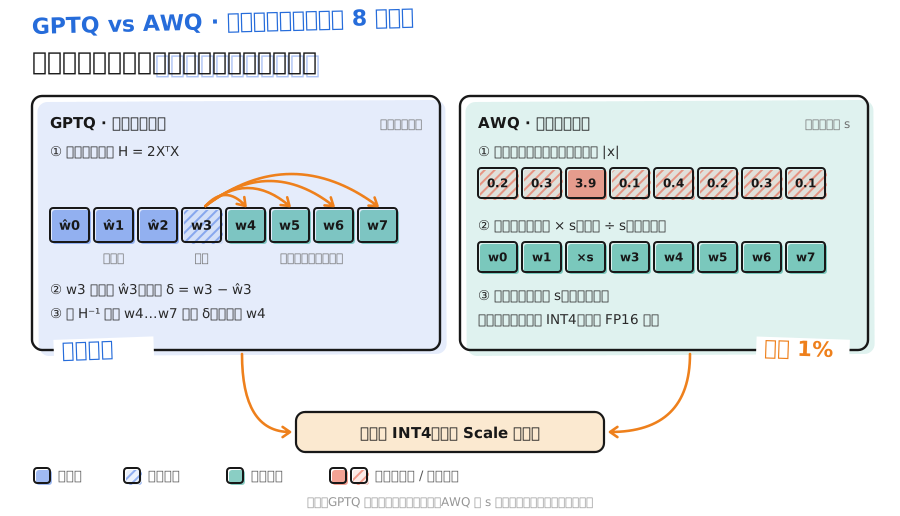
Once all four are fixed, compare the algorithms themselves:
| 📊 Dimension | GPTQ | AWQ |
|---|---|---|
| What calibration data is for | Build ; measure layer-output error | Collect activations; search per-channel scales |
| Main lever | Quantize column by column; compensate remaining weights | Amplify salient channels; cut their relative error |
| Offline compute | Solve a reconstruction problem per layer; update every weight | Search per-channel scale factors; do not rewrite weights one by one |
| Inference speed | Depends on export layout and kernel | Likewise depends on export layout and kernel |
“AWQ is always faster” and “GPTQ is always more accurate” both lack premises. A fair comparison at least fixes the base model, bit width, Group Size, calibration set, input length, and load, and records which kernel actually loaded.
5.2 Which tools to quantize with
- LLM Compressor: maintained by the vLLM project; supports GPTQ, AWQ, and SmoothQuant; exports
compressed-tensorsthat vLLM loads directly. The vLLM docs’ INT4 W4A16 example usesGPTQModifier(scheme="W4A16"). - GPTQModel: focused on the GPTQ family; the docs note that compatible models can use vLLM’s Marlin and Machete kernels.
- AutoAWQ: no longer maintained. The vLLM docs recommend switching to AWQ in LLM Compressor. Existing AutoAWQ checkpoints still load fine.
5.3 Debugging order
- Confirm the checkpoint: is the quantization config complete, and do the base model and version match.
- Read the load log: which kernel won, and was there a fallback.
- Check quality first: evaluate on an independent task set; do not cherry-pick a few pretty outputs.
- Then measure performance: look separately at small-batch decode, large batch, and long prompts. Memory freed by quantization may also go into higher concurrency.
📝 Summary
- W4A16 compresses only weights. Storage is INT4; multiply inputs stay 16-bit. What you save is weight-read bandwidth.
- GPTQ measures layer-output error with calibration inputs and, via , compensates each weight’s error onto still-unquantized weights.
- AWQ finds salient channels by activation size and protects them with scaling instead of mixed precision, so the deployment layout stays regular.
- Marlin fuses unpacking, dequantization, and matrix multiply into one pipeline. Small batches approach 4× theoretical speedup; gains shrink as the batch grows.
- In vLLM v0.32.0, AWQ/GPTQ method aliases are unified and kernels are auto-selected by priority. Trust the startup log.
- Before comparing GPTQ and AWQ, fix format, granularity, and kernel first.
🎯 Self-check list
- Can compute average storage per INT4 weight under Group Size 128 with FP16 Scale
- Can explain why is closer to layer output than looking at weight error alone
- Can illustrate GPTQ’s compensation idea with two highly correlated input channels
- Can tell GPTQ’s update block size apart from quantization Group Size
- Can explain why AWQ finds salient channels from activations rather than weights, and why it uses scaling instead of mixed precision
- Can contrast the direction and purpose of paired scaling in AWQ vs SmoothQuant
- Can explain why Marlin’s speedup shrinks as the batch grows
- Can tell from a vLLM startup log which kernel an INT4 model actually used
📚 References
- GPTQ: Accurate Post-Training Quantization for Generative Pre-trained Transformers (Frantar et al., 2022)
- GPTQ official code
- AWQ: Activation-aware Weight Quantization for LLM Compression and Acceleration (Lin et al., 2023)
- AWQ official code
- MARLIN: Mixed-Precision Auto-Regressive Parallel Inference on Large Language Models (Frantar et al., 2024)
- Marlin official code
- vLLM v0.32.0 — INT4 W4A16 (LLM Compressor)
- vLLM v0.32.0 — AutoAWQ
- vLLM v0.32.0 — GPTQModel
- vLLM v0.32.0 — linear-layer kernel selection source