6.5 Multi-node deployment
vLLM's two multi-node runtimes: building a Ray cluster, Placement Groups and rank layout, mp-mode --nnodes launch, multi-node MoE DP+EP, plus InfiniBand / GPUDirect RDMA setup and common troubleshooting
Earlier sections settled how to cut: TP stays in-node; cross-node goes to PP; MoE uses attention DP + expert EP. This section answers the next question: how GPUs on two or four machines form one vLLM service.
vLLM has two multi-node runtimes. Ray first pulls the machines into a cluster, then you run vllm serve on only one node; multiprocess (mp) mode needs no cluster—each machine runs a command with --node-rank. MoE DP + EP has its own parameter set. Either way the network must match, or cross-node traffic falls back to TCP sockets and every careful split design gets dragged down.
⏰ Currency: vLLM flags, defaults, and logs follow v0.32.0 (released 2026-10-18) docs and source, including
docs/serving/parallelism_scaling.md,data_parallel_deployment.md,expert_parallel_deployment.md, andexamples/ray_serving/run_cluster.sh.
📑 Contents
- 1. Before go-live: same env, trusted network
- 2. Two runtimes: Ray and multiprocess
- 3. Deploy TP×PP with Ray
- 4. Deploy TP×PP with multiprocess
- 5. Multi-node MoE DP + EP
- 6. Network setup: make NCCL use InfiniBand
- 7. Troubleshooting checklist
- Summary
- Self-check list
- References
1. Before go-live: same env, trusted network
1.1 Every node’s environment must match
In multi-node deploy, processes on each node load the same model and run the same code. vLLM docs require every node’s runtime to match, including model path and Python package versions. The easiest path is one container image on every node (e.g. vllm/vllm-openai), so host differences stay outside the container.
Prefer downloading the model ahead of time. Put a copy at the same path on each node, or on a shared filesystem every node can read, and pass a local path at start—not a Hugging Face repo name. If you must download online, pass HF_TOKEN to every node.
⚠️ Note: Large models on a network filesystem can load very slowly. vLLM’s troubleshooting docs suggest local disk when possible, and watch host RAM during load; when RAM is short the system pages heavily and looks hung.
1.2 Inter-node network must be private
Across nodes, vLLM control traffic is unencrypted. If an attacker reaches the serialization used to exchange data, they can run arbitrary code. vLLM docs warn clearly: the address for inter-node communication (VLLM_HOST_IP) must sit on a private segment so untrusted parties cannot reach that network.
📌 Key point: Do not expose Ray ports or DP RPC ports to the public internet. Open only the API Server HTTP port outward, with auth in front.
2. Two runtimes: Ray and multiprocess
vLLM picks the runtime with --distributed-executor-backend; common values are mp and ray:
| 📊 | Ray | Multiprocess (mp) |
|---|---|---|
| Prep | Start a Ray cluster on every node first | No extra component |
Start vllm serve | Once, on one node | Once on every node |
| Node identity | Ray assigns by resources | --nnodes, --node-rank by hand |
| Extra deps | pip install "ray[cgraph]" | None |
| Extras | Ray’s own observability; can plug into Ray Serve / Ray Data | None |
vLLM docs say “multi-node defaults to Ray, single-node defaults to multiprocess”. Actual v0.32.0 logic when you omit --distributed-executor-backend is more specific:
- If
--nnodes > 1, usemp. - Else, if one replica’s world size (TP × PP) exceeds local GPU count, error out and ask you to choose: Ray via
--distributed-executor-backend ray, or multiprocess via--nnodes. - If it fits locally: use
raywhen--data-parallel-backend rayis set or you are already in a Ray Placement Group; otherwisemp.
Also, --nnodes > 1 only pairs with mp; using it with ray errors.
💡 Tip: On multi-node always write --distributed-executor-backend explicitly; do not rely on defaults. The DEBUG log line Defaulting to use ... for distributed inference confirms which one won.
3. Deploy TP×PP with Ray
3.1 Bring up the Ray cluster
Ray is a framework that scales Python across machines. vLLM uses it to manage cross-node Worker processes and decide which card on which machine each Worker runs on.
The vLLM repo ships a helper examples/ray_serving/run_cluster.sh that starts a container and Ray on each node. Pick one machine as Head:
# Head node
bash run_cluster.sh \
    vllm/vllm-openai \
    <HEAD_NODE_IP> \
    --head \
    /path/to/huggingface/home \
    -e VLLM_HOST_IP=<HEAD_NODE_IP>
Every other machine joins as a Worker:
# Each Worker node; VLLM_HOST_IP is this machine's address
bash run_cluster.sh \
    vllm/vllm-openai \
    <HEAD_NODE_IP> \
    --worker \
    /path/to/huggingface/home \
    -e VLLM_HOST_IP=<WORKER_NODE_IP>
The script does this:
- Starts a container with
docker run --network host --gpus all --shm-size 10.24g, mounts the 4th argument at/root/.cache/huggingface, and appends everything after the 4th argument todocker runas-is. - Head runs
ray start --block --head --node-ip-address=<HEAD_NODE_IP> --port=6379; Workers runray start --block --address=<HEAD_NODE_IP>:6379; withVLLM_HOST_IPit also adds--node-ip-address. --blockkeeps Ray in the foreground; when the script exits it stops and removes the container.
So those terminals must stay open. Per the script comments, closing any one stops that Ray node and the whole cluster follows.
Once the cluster is up, enter any container and run ray status and ray list nodes to confirm node and GPU counts, and that each node’s registered IP is the VLLM_HOST_IP you set.
💡 Tip: Pass extra env vars (e.g. -e NCCL_SOCKET_IFNAME=eth0) through run_cluster.sh at this step. vLLM docs stress that vars set when the cluster starts propagate to every node; a Shell export only affects the local node. If you need Nsight or similar to read GPU performance counters, also add --cap-add=CAP_SYS_ADMIN to docker run.
On Kubernetes you can also build a Ray cluster with KubeRay; Ray docs have a vLLM example.
3.2 Start the service
With the Ray cluster running, every GPU in the cluster is visible to vLLM. Run vllm serve once inside one node’s container. Two 8-GPU machines, following section 6.2: TP = GPUs per node, PP = node count:
# Inside the Head node's container (docker exec -it <container_name> /bin/bash)
vllm serve /path/to/the/model/in/the/container \
    --tensor-parallel-size 8 \
    --pipeline-parallel-size 2 \
    --distributed-executor-backend ray
Docs also show --tensor-parallel-size 16, treating all 16 cards as one TP group. That is only worth it when inter-node bandwidth is high enough; section 6.3’s cost model put concurrency-64 TPOT at about 1.9× TP=8 × PP=2 on ordinary 400 Gb/s networks.
3.3 How Workers land on cards
vLLM asks Ray for a Placement Group: one {"GPU": 1} bundle per Worker, TP × PP of them, placement strategy PACK (pack onto the same node when possible). v0.32.0 defaults to RayExecutorV2 (VLLM_USE_RAY_V2_EXECUTOR_BACKEND=1), which does not require the node that runs vllm serve to have a free GPU; set that variable to 0 and fall back to old RayDistributedExecutor, and source forces the first bundle onto the serve node, so that node needs at least one free GPU.
After bundles are granted, vLLM checks how many each node got. If some node got fewer than TP size, it prints a warning: TP Workers may spread across two or more nodes; without InfiniBand-class interconnect, performance drops.
TP groups land cleanly inside one node because of rank order. vLLM numbers all Workers as ExternalDP × DP × PP × PCP × TP, with TP the innermost dimension, so ranks 0–7 are Stage 0’s TP group and 8–15 are Stage 1’s. After creating Workers the Ray executor reorders by node (serve node first), then assigns ranks, so consecutive ranks sit on one machine:
| 📊 Rank | Node | PP Stage | TP rank |
|---|---|---|---|
| 0–7 | Head | 0 | 0–7 |
| 8–15 | Worker | 1 | 0–7 |
That is the right half of section 6.2’s figure: AllReduce stays on in-node NVLink; nodes only pass activations once at the stage boundary.
4. Deploy TP×PP with multiprocess
If you do not want to keep a Ray cluster, use multiprocess. Same two 8-GPU machines, TP=8 × PP=2. On the Head node:
# Node 0 (Head)
vllm serve /path/to/the/model/in/the/container \
    --tensor-parallel-size 8 --pipeline-parallel-size 2 \
    --nnodes 2 --node-rank 0 \
    --master-addr <HEAD_NODE_IP>
On the other node:
# Node 1
vllm serve /path/to/the/model/in/the/container \
    --tensor-parallel-size 8 --pipeline-parallel-size 2 \
    --nnodes 2 --node-rank 1 \
    --master-addr <HEAD_NODE_IP> --headless
What the flags mean:
--nnodes: total node count. Once set, vLLM picksmpautomatically; you need not also write--distributed-executor-backend.--node-rank: this node’s index, from 0. Rank layout matches Ray; TP is innermost; Node 0 owns Stage 0.--master-addr: Head address; every node uses the same. Port via--master-port, default 29501; every node must reach it.--headless: this node only runs Workers, no API Server. Requests enter through the Head node’s HTTP port.
How to choose the runtime:
| 🎯 Situation | Choice |
|---|---|
| You already have Ray or KubeRay, or want Ray Serve for upper orchestration | Ray |
| Few nodes, no new component; Kubernetes or Slurm starts each node’s process | Multiprocess |
⚠️ Note: In multiprocess mode, every node’s command should match except --node-rank and --headless. All nodes load different shards of the same model; mismatched model path, parallelism, or --max-model-len makes model and memory splits disagree. One script that only swaps the node index is the safest pattern.
5. Multi-node MoE DP + EP
5.1 One command per machine, each declaring its ranks
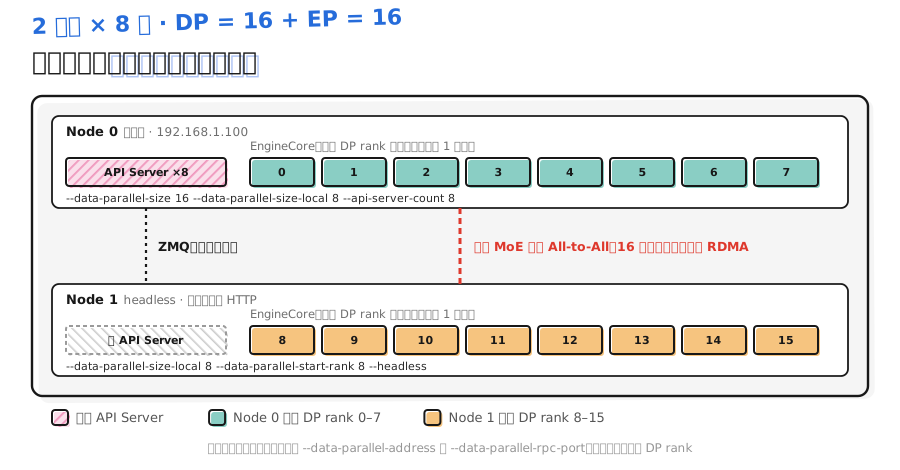
Section 6.4 said each DP rank in DP + EP is its own EngineCore. Across nodes, every machine runs one vllm serve saying which DP ranks live there. Below is the vLLM-doc example for DeepSeek-V3-0324 on two 8-GPU machines: one DP rank per card, DP=16, EP=16:
# Node 0 (primary, 192.168.1.100, receives requests)
vllm serve deepseek-ai/DeepSeek-V3-0324 \
    --all2all-backend deepep_low_latency \
    --tensor-parallel-size 1 \
    --enable-expert-parallel \
    --data-parallel-size 16 \
    --data-parallel-size-local 8 \
    --data-parallel-address 192.168.1.100 \
    --data-parallel-rpc-port 13345 \
    --api-server-count=8
# Node 1 (headless, no API Server)
vllm serve deepseek-ai/DeepSeek-V3-0324 \
    --all2all-backend deepep_low_latency \
    --tensor-parallel-size 1 \
    --enable-expert-parallel \
    --data-parallel-size 16 \
    --data-parallel-size-local 8 \
    --data-parallel-start-rank 8 \
    --data-parallel-address 192.168.1.100 \
    --data-parallel-rpc-port 13345 \
    --headless
The figure is the structure those two commands start. Cyan and orange cells are DP ranks on the two machines; the red dashed line means every MoE-layer All-to-All needs all 16 cards:
| 📊 Flag | Meaning |
|---|---|
--data-parallel-size | Global DP size; same value on every node |
--data-parallel-size-local | How many DP ranks this node runs |
--data-parallel-start-rank | Index of this node’s first DP rank = sum of prior nodes’ local counts |
--data-parallel-address / --data-parallel-rpc-port | Primary node’s address and RPC port; same on every node; port must be reachable |
--headless | No API Server; only EngineCores |
--api-server-count | API Server process count on the primary; still one external HTTP port |
A few points:
--enable-expert-parallelon every node; same for EPLB flags.- At large DP a single API Server process becomes the bottleneck; docs suggest raising
--api-server-countto match local rank count. That scale-out only happens inside the primary. In v0.32.0, omitting the flag: internal load-balance mode defaults to--data-parallel-sizeAPI Servers; Hybrid mode defaults to local rank count. --data-parallel-size-localcan be 0: primary only runs API Servers; all EngineCores live elsewhere.- The DP Coordinator process sits with DP rank 0’s engine and handles the dummy-run coordination from section 6.4.
5.2 Bring up DP with Ray
With --data-parallel-backend=ray, run one command on one node; remote DP ranks are placed by Ray from cluster resources:
vllm serve $MODEL --data-parallel-size 4 --data-parallel-size-local 2 \
                  --data-parallel-backend=ray
You need not write --data-parallel-address or --data-parallel-rpc-port; the node that runs the command is primary. How DP ranks pack onto nodes is controlled by VLLM_RAY_DP_PACK_STRATEGY:
| 📊 Value | Behavior |
|---|---|
strict (default) | Every chosen node gets exactly --data-parallel-size-local DP ranks |
fill | Primary gets --data-parallel-size-local; other nodes take as many as they can |
span | When one DP rank must span multiple nodes; --data-parallel-size-local is ignored |
span is for when one replica already does not fit one machine—e.g. TP=8 × PP=2 inside each DP rank.
5.3 Not a single entry: Hybrid and External load balance
All of the above has one HTTP entry. At larger scale vLLM also supports:
- Hybrid (
--data-parallel-hybrid-lb): every node starts its own API Server and only routes to local DP ranks, with an external load balancer in front. Nodes still set global--data-parallel-size, plus--data-parallel-size-localand--data-parallel-start-rank. Cannot pair with--headless. - External (
--data-parallel-external-lb): every DP rank is its own service endpoint, numbered with--data-parallel-rank; an external router dispatches from each rank’s live state.
⚠️ Note: vLLM docs say External-mode DP flags only support MoE. Dense replicas need no sync—just start several independent instances without --data-parallel-* behind a load balancer, as section 6.4 already covered.
6. Network setup: make NCCL use InfiniBand
6.1 InfiniBand and GPUDirect RDMA
Cross-node TP, PP, and EP traffic all go through NCCL. With InfiniBand between nodes, the container must see the NIC. vLLM docs append flags to run_cluster.sh:
bash run_cluster.sh vllm/vllm-openai <HEAD_NODE_IP> --head /path/to/huggingface/home \
    -e VLLM_HOST_IP=<HEAD_NODE_IP> \
    --privileged -e NCCL_IB_HCA=mlx5
NCCL_IB_HCA picks which RDMA NICs NCCL uses. Per NCCL docs it defaults to prefix match; mlx5 means every port on every card whose name starts with mlx5; for an exact card, prefix with =. Which flags your cluster needs depends on network setup; confirm with the admin.
GPUDirect RDMA lets the NIC read/write GPU memory directly so data need not bounce through host RAM first—lower latency and CPU cost. Enabling it needs two things:
- Container
IPC_LOCKcapability, to lock memory pages against swap. - Mount
/dev/shmfor shared memory used by IPC.
Docker form:
docker run --gpus all \
    --ipc=host \
    --shm-size=16G \
    -v /dev/shm:/dev/shm \
    vllm/vllm-openai
In a Kubernetes Pod that is securityContext.capabilities.add: ["IPC_LOCK"] plus an emptyDir (medium: Memory) mounted at /dev/shm:
spec:
  containers:
    - name: vllm
      image: vllm/vllm-openai
      securityContext:
        capabilities:
          add: ["IPC_LOCK"]
      volumeMounts:
        - mountPath: /dev/shm
          name: dshm
      resources:
        limits:
          nvidia.com/gpu: 8
  volumes:
    - name: dshm
      emptyDir:
        medium: Memory
6.2 Confirm NCCL really uses RDMA
Correct config does not mean it took effect. Start with NCCL_DEBUG=TRACE vllm serve ... and look in the log for which transport NCCL chose:
| 📊 Log snippet | Meaning |
|---|---|
[send] via NET/IB/GDRDMA | InfiniBand + GPUDirect RDMA; good |
[send] via NET/Socket | Fell back to TCP Socket; cross-node TP will be very slow |
📌 Key point: With NET/Socket the service still starts and returns results—just slowly. Many “multi-node slower than single-node” issues root here. Check this line before go-live.
6.3 Multi-NIC machines must pick the NIC
Servers often have several interfaces (mgmt, traffic, IB). If vLLM picks the wrong IP, traffic may land on the wrong network or nodes may not connect at all. How to check:
- Find
distributed_init_method=tcp://x.x.x.x:portin the log and confirm the IP is the one you want. - If not, set
VLLM_HOST_IPto this machine’s address on every node. - Also set
NCCL_SOCKET_IFNAMEandGLOO_SOCKET_IFNAMEto the interface name: the former limits NCCL’s IP NIC; the latter limits PyTorch Gloo (CPU-side collectives). NCCL’s var is also prefix-matched;ethmatcheseth0,eth1, etc.;=eth0matches onlyeth0.
7. Troubleshooting checklist
7.1 Test communication outside vLLM first
When multi-node breaks, confirm hardware- and driver-level communication first, then look at vLLM. The script below runs one NCCL AllReduce and one Gloo AllReduce per card; if the result equals world size, it works. vLLM’s troubleshooting docs have a fuller version that also tests vLLM’s own NCCL wrapper and AllReduce under CUDA Graph.
# nccl_check.py: torchrun starts one process per card; test GPU NCCL and CPU Gloo
import os
import torch
import torch.distributed as dist

dist.init_process_group(backend="nccl")
rank, world = dist.get_rank(), dist.get_world_size()
torch.cuda.set_device(int(os.environ["LOCAL_RANK"]))  # torchrun sets per-process local index

x = torch.ones(1024, device="cuda")
dist.all_reduce(x)                                   # cross-node this uses IB or Socket
torch.cuda.synchronize()
assert x[0].item() == world, f"NCCL: expected {world}, got {x[0].item()}"

gloo = dist.new_group(backend="gloo")
y = torch.ones(1024)
dist.all_reduce(y, group=gloo)                       # verify GLOO_SOCKET_IFNAME NIC
assert y[0].item() == world, f"Gloo: expected {world}, got {y[0].item()}"

if rank == 0:
    print(f"NCCL and Gloo all_reduce OK, world_size={world}")
dist.destroy_process_group()
On two 8-GPU machines (NODE_RANK is 0 on Head, 1 on the other):
NCCL_DEBUG=TRACE torchrun --nnodes 2 --nproc-per-node 8 \
    --rdzv_backend=static --rdzv_endpoint=<HEAD_NODE_IP>:29400 \
    --node-rank $NODE_RANK nccl_check.py
vLLM docs deliberately use --rdzv_backend=static instead of c10d, because the latter can fail DNS across nodes. NCCL_DEBUG=TRACE is on so you can also check section 6’s NET/IB/GDRDMA.
If the script hangs or crashes, the problem is usually hardware, driver, or network config. Vars like NCCL_P2P_DISABLE=1 can temporarily work around, but they hurt performance—use them to locate the issue, not as a fix.
7.2 Common errors
| ❓ Symptom | Likely cause | Fix |
|---|---|---|
No available node types can fulfill resource request, but GPUs are free | Node has multiple IPs; vLLM and Ray disagree | Set each node’s VLLM_HOST_IP in run_cluster.sh; check with ray list nodes |
Current node has no GPU available or driver node id ... is not included in a placement group (old RayDistributedExecutor) | The node running vllm serve has no free GPU | Run on a node with a free GPU, or free a GPU on this node |
Warning Tensor parallel workers can be spread out to 2+ nodes | TP larger than GPUs assigned to some node | Keep TP ≤ GPUs per node, or confirm high-speed interconnect |
NCCL error: unhandled system error in ncclCommInitRank | GPUDirect RDMA without IPC_LOCK or /dev/shm | Fix container setup per section 6 |
On PCIe machines peer access is not supported between these two devices | Driver issue | Set NCCL_CUMEM_HOST_ENABLE=0, or upgrade the driver |
| Runs but cross-node is very slow | NCCL fell back to NET/Socket | Check NCCL_IB_HCA, --privileged, GPUDirect RDMA |
World size (...) is larger than the number of available GPUs | Multi-node without a runtime chosen | Add --distributed-executor-backend ray or --nnodes |
Custom AllReduce issues (section 6.2) can be ruled out with --disable-custom-all-reduce.
7.3 When stuck, turn on more logging
If the service hangs with no error, vLLM docs suggest enabling these in order:
| 📊 Env var | Role |
|---|---|
VLLM_LOGGING_LEVEL=DEBUG | Verbose vLLM logs |
NCCL_DEBUG=TRACE | Verbose NCCL logs |
CUDA_LAUNCH_BLOCKING=1 | Sync CUDA kernels; find the failing kernel |
VLLM_TRACE_FUNCTION=1 | Record every function call; find the hang; slows generation 100×+; only when needed |
⚠️ Note: On multi-node set these on every node. With Ray, pass via run_cluster.sh’s -e; with multiprocess, set in each node’s start script. Remove them after debugging or debug features keep slowing the service.
Ray’s own issues (Actors failing to start, nodes dropping) can use Ray’s observability and debug guides; KubeRay has its own troubleshooting docs.
📝 Summary
- Multi-node needs matching environments on every node; prefer one container image and pre-downloaded models. Inter-node traffic is unencrypted—keep it on a private network.
- Ray mode: start the cluster with
run_cluster.sh, then runvllm serve --distributed-executor-backend rayonce on one node. Multiprocess: every node runs once with--nnodes,--node-rank,--master-addr; non-primary add--headless. - vLLM ranks as
ExternalDP × DP × PP × PCP × TP, TP innermost. Ray Placement Groups usePACKand reorder Workers by node, so when TP = GPUs per node the TP group lands on one machine. - Multi-node MoE DP + EP: one command per node with
--data-parallel-size-localand--data-parallel-start-rank; non-primary--headless. Or one command with--data-parallel-backend=ray. - InfiniBand needs
--privileged -e NCCL_IB_HCA=mlx5; GPUDirect RDMA needsIPC_LOCKand/dev/shm. Confirm withNCCL_DEBUG=TRACEthat logs showNET/IB/GDRDMA, notNET/Socket. - On failure, first test communication with a torchrun script outside vLLM, then match the error table.
🎯 Self-check list
- Can name what must match across nodes before multi-node deploy, and why the inter-node network must be private
- Can bring up a two-node Ray cluster with
run_cluster.shand verify withray status/ray list nodes - Can write TP=8 × PP=2 start commands for both Ray and multiprocess
- Can explain from rank layout why a TP group lands on one node, and when the cross-node TP warning appears
- Can write each node’s
--data-parallel-*flags for a three-node MoE deploy with 8 DP ranks per node - Can configure InfiniBand and GPUDirect RDMA in the container and confirm via NCCL logs
- Can test cross-node communication with a torchrun script and locate issues from the common-error table
📚 References
- vLLM docs: Parallelism and Scaling
- vLLM docs: Data Parallel Deployment
- vLLM docs: Expert Parallel Deployment
- vLLM docs: Troubleshooting distributed deployments
- vLLM docs: Troubleshooting
- vLLM source: examples/ray_serving/run_cluster.sh (v0.32.0)
- vLLM source: vllm/v1/executor/ray_utils.py (v0.32.0)
- vLLM source: vllm/distributed/parallel_state.py (v0.32.0)
- NCCL docs: Environment Variables
- Ray docs: Placement Groups
- Ray docs: Ray on Kubernetes (KubeRay)